Landmarks
A map of the places you have been, country by country
OptiSafari keeps two records of where you have been: the streets you walked, cleared from the fog for good, and the landmarks you checked in at, out of more than 23,000 landmarks in 49 countries.
Updated November 17, 2026 · Free on the App Store · iPhone and Apple Watch, iOS 17+
Why keep a map of places you have been
A list of countries in a notes app says where you went, not what you saw. OptiSafari works more like a travel tracker and a scratch map in one: the map starts under fog and opens only where you have really been, so your footprint shows street by street, and each landmark you check in at is ticked off in its city and country.
It keeps your record in three places:
| Where | What it shows |
|---|---|
| The map card on Home | Your explored map: the ground you have walked |
| The Landmarks tab | Every continent, country and city, with how many of its landmarks you have checked in at |
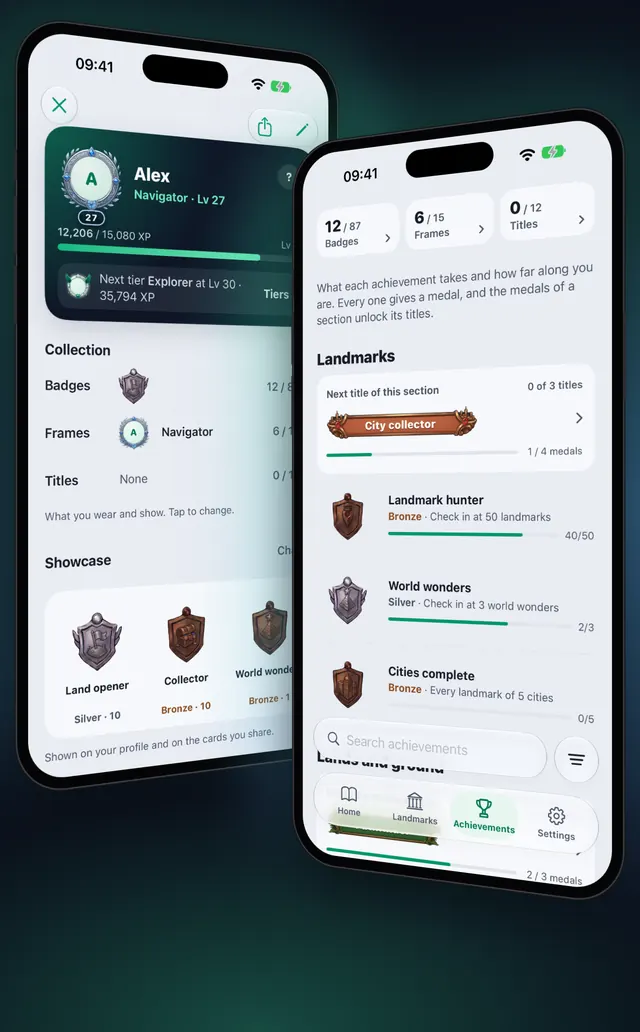
| The Achievements tab | Medals for the countries and continents you have set foot in and the provinces you have opened |
OptiSafari does not count countries or cities visited as a number of its own, and it has no world map of visited countries. Your progress shows as landmarks checked in per country and city, and as medal progress.
See the places you have been, step by step
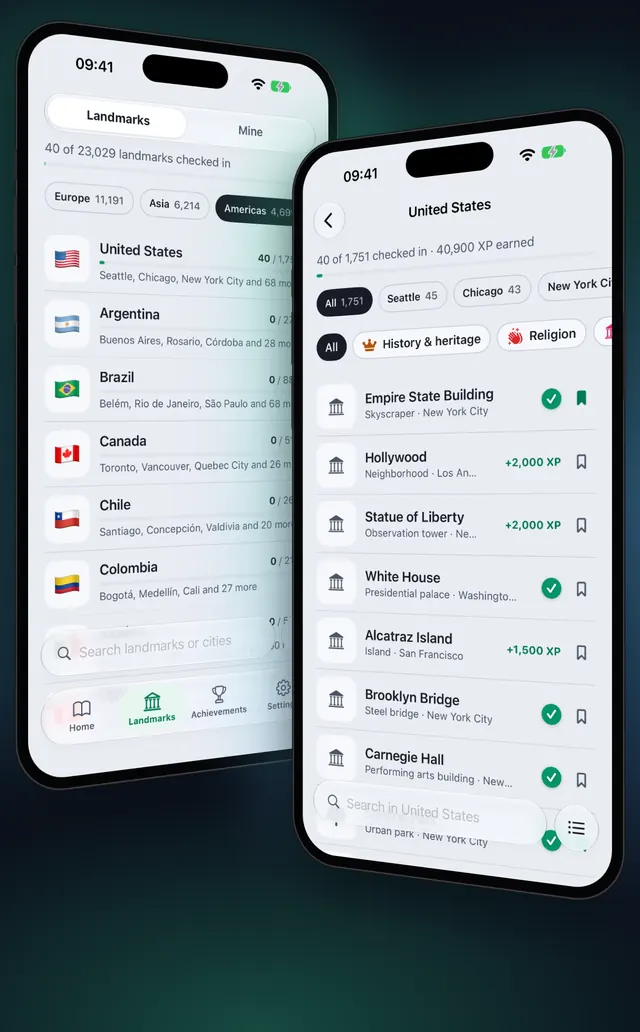
- Tap the Landmarks tab and keep Landmarks selected at the top (Mine holds the places you saved yourself).
- Read the line at the top: how many landmarks you have checked in at, out of all of them, with a progress bar.
- Tap a continent chip to see only its countries. Each country card shows the landmarks you have checked in at out of its total, and its cities.
- Tap the button beside the search bar and choose List or Grid under Show as.
- Tap a country to open its page. The header shows how many of its landmarks you have checked in at and the XP they earned.
- Tap a city chip to see only that city, or All for the whole country.
- Sort the landmarks by Nearest, Most XP, Not visited first or Name. Not visited first puts what is left to see on top.
- To jump to a place, type in Search landmarks or cities at the bottom.
A country whose landmarks are not on your iPhone yet offers a download button with its size on its page. Your check-ins and XP there stay either way; see Walk offline with city maps.
Your explored map
The map card on Home opens your explored map, which grows only during a walk: How a fog-of-war walking map works.
Countries and continents in your medals
The World section of Achievements follows the countries and continents you have set foot in:
| Medal | What counts | Steps |
|---|---|---|
| Traveller | Countries set foot in | 2, 5, 10, 25 and 50 countries |
| Continents | Continents set foot on | 2 to 6 continents |
| Land opener | Provinces and states opened | 5, 10, 25, 50 and 100 |
| Border crosser | Walking from one country into another | Once |
You have set foot in a country once you check in at one of its landmarks or open one of its provinces. There is also a medal for each world region, for setting foot in its countries, and the frames World citizen (10 countries) and Six continents.
Tips
- Check in, do not just pass by. Walking past a landmark discovers it; only a check-in counts toward your country and city: Check in at landmarks.
- Plan the next visit. On a country page, Not visited first with a city chip shows what is left in that city.
- Download before you travel. The landmarks of a country come with its download, so get it before you land: Walk offline with city maps.
OptiSafari — Places Visited, Travel Tracker
Free · No account · Works offline
Frequently asked questions
Can OptiSafari count the countries I have visited?
Not as a number of its own. The Traveller medal shows your progress in countries you have set foot in, and the Landmarks tab shows how many landmarks you have checked in at in each country.
Does it add places I visited before I installed it?
No. Trips before you installed OptiSafari cannot be added. Your map opens only where you walk with a walk running, and a check-in needs you to be at the landmark.
Can I see my places on a world map?
Your explored ground is on the map, wherever you have walked. There is no separate world map that colours visited countries.
Can I add a place that is not a landmark?
Yes. Add it as your own place with Add place on the map; you find it under Mine. Your own places earn no XP and do not count toward countries, cities or medals.
Does it track places in the background?
No. OptiSafari records only during a walk, from Start to End walk. Nothing is recorded between walks.